The 60-second answer
When a recruiter opens your GitHub, they scan for signals, not code: a clear profile README, three to six pinned projects with real READMEs, recent genuine activity, and repos that match the skills on your resume. They spend under a minute. So make the top of your profile do the work, pin your best projects, write one honest line about each, and keep a clean link in your resume header. An empty GitHub linked on a resume hurts you more than no link at all.
For any developer or data role, your GitHub is a portfolio recruiters can actually verify, which is exactly why it carries weight. This guide covers what they check, how to set up the two things that matter most (the profile README and pinned repos), how to link it on your resume, and the red flags that make a strong candidate look weak.
What recruiters actually check
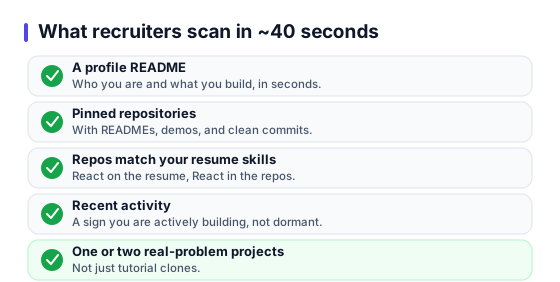
In the ~40 seconds a recruiter spends on your profile, they look for:
- A profile README that explains who you are and what you build, in seconds.
- Pinned repositories, and whether they have READMEs, demos, and clean commits.
- Whether your repos match the skills your resume claims (React on the resume, React in the repos).
- Recent activity, a sign you are actively building, not dormant.
- One or two projects that solve a real problem, not just tutorial clones.
The profile README (your first impression)
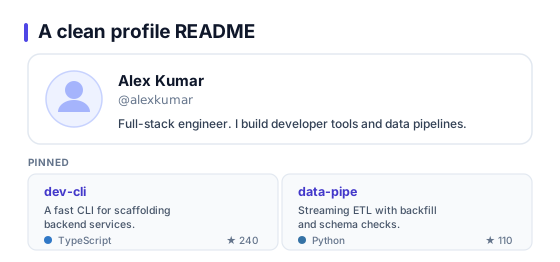
A profile README is the panel that shows at the top of your GitHub page (create a repo named exactly your username, add a README.md). Keep it short and scannable:
# Hi, I'm Priya

Final-year CSE student. I build full-stack web apps with React + Node.

- Currently: a resume-parser side project (Python + spaCy)
- Stack: JavaScript/TypeScript, React, Node, PostgreSQL
- Reach me: priya@email.com | linkedin.com/in/priya-x

Pinned below are my three favorite builds.
That is enough. Skip the animated banners, the 40 technology badges, and the visitor counters. They add noise and hide the signal.
Pinning the right repos
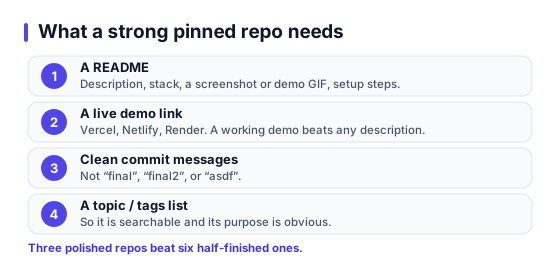
Pin three to six repositories, your best and most complete work. For each pinned repo, make sure it has:
- A README with a one-line description, the stack, a screenshot or demo GIF, and setup steps.
- A live demo link (Vercel, Netlify, Render) where it applies. A working demo beats any description.
- Clean, meaningful commit messages, not "final", "final2", "asdf".
- A topic/tags list so it is searchable and its purpose is obvious.
Three polished repos beat six half-finished ones. Recruiters judge your best work, so lead with it.
How to link it on your resume
Put a short, clickable GitHub link in your resume header, next to your email and LinkedIn, for example github.com/yourusername. Keep the same clean formatting for all your links. Our formats the header links cleanly and keeps them ATS-parseable, and the LinkedIn URL guide covers the same for your profile link.
6 red flags to fix before you link it
- An empty or near-empty profile, link it only when there is something to see.
- Pinned repos with no README, recruiters cannot tell what they do.
- Only tutorial clones, add at least one project that solves a real problem.
- A skills mismatch, your resume says Python but every repo is HTML.
- Messy commit history and no descriptions.
- A fake-looking contribution graph from empty daily commits.
Frequently asked questions
Do recruiters actually look at my GitHub?+
For technical roles, often yes, especially when you link it prominently and the rest of your resume is strong. They rarely read your code line by line. They scan for signals: a clear profile README, a few well-documented pinned projects, recent activity, and whether your repos match the skills you claim. A dead or empty GitHub linked on a resume is worse than no link at all.
Should a fresher put GitHub on their resume?+
Yes, if you have at least two or three real projects with READMEs. GitHub is one of the strongest signals a fresher can show, because it demonstrates you can actually build and ship, not just list skills. If your GitHub is empty, spend a weekend pushing your college projects with proper READMEs before you link it.
What makes a good GitHub profile README?+
A short intro (who you are and what you build), your core stack, links to two or three flagship projects with one line each on what they do, and how to reach you. Keep it scannable. Skip the giant animated banners and the long list of technology badges, which read as noise to a recruiter.
How many repositories should I pin?+
Pin three to six. Choose your best, most complete projects, each with a clear README, a live demo link if possible, and clean commit history. It is better to pin three polished repos than six half-finished ones. Recruiters judge your best work, and clutter dilutes it.
Does my GitHub contribution graph matter?+
Recent, genuine activity helps, because it signals you are actively building. But do not game it with empty daily commits, that is transparent and unimpressive. A steady pattern of real commits over a few months beats a suspicious wall of green squares.
How should I link GitHub on my resume?+
Use a short, clean, clickable link in your header, for example github.com/yourusername, right next to your email and LinkedIn. Do not paste the full https prefix in body text, and make sure the username matches the profile you actually want them to see.
Put your GitHub on a resume that lands
Free to start, no sign-up. Clean header links and project sections that make your best work easy to find.