Why LaTeX
LaTeX gives you pixel-level control over layout, perfect typography, and a resume that looks identical everywhere. No silent font substitutions, no mysterious line-breaks after the recruiter opens it in LibreOffice. The tradeoff is a 30-minute learning curve. If you already think in code, the ROI is strong.
Engineers pick LaTeX for three reasons: the output is beautiful by default, the version-controlled source file is a single .tex that diffs cleanly in git, and a line-height tweak is one character in the source rather than a click-path in Word. The downsides: first compile can feel slow, debug cycles on package errors eat time, and some ATS platforms mis-parse PDFs generated by older LaTeX engines.
This guide ranks 7 popular templates by use case, gives you a minimal starter file you can drop into Overleaf today, and covers the layout pitfalls that trip up most first-timers.
When to use LaTeX (and when not to)
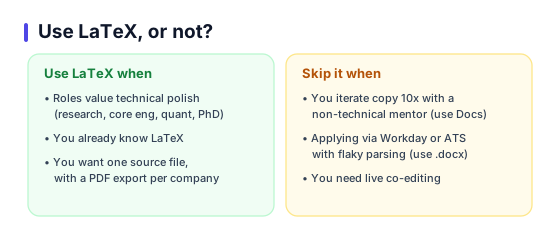
Use LaTeX when: you are applying to roles that value technical polish (research labs, core engineering, quant, PhD programs), you already know LaTeX from coursework, or you want one canonical source file with a PDF export per target company.
Do not use LaTeX when: you need to iterate on copy 10 times with a non-technical mentor (use Docs), you are applying through Workday or other ATS platforms known for flaky PDF parse on complex layouts (use a simple .docx), or you need collaborative live editing with a reviewer.
Most candidates end up with two artifacts: a LaTeX master for personal archives and polished PDF submissions, and a plain .docx for Easy Apply and Naukri uploads. Maintain both. The .docx can be auto-generated from the LaTeX source with pandoc.
7 templates ranked by use case
Deedy Resume (Two Column) by Debarghya Das
Best for: Software engineers, CS new grads, campus placement
Strengths
2-column dense layout fits a lot on one page, very popular on the placement circuit, looks instantly familiar to recruiters who hire CS grads.
Cautions
The 2-column format is not ATS-safe. Use only when you are submitting to a human recruiter or uploading to platforms that accept the PDF verbatim. Avoid for bulk Naukri / LinkedIn Easy Apply flows.
Awesome-CV by Byungjin Park
Best for: Senior engineers, technical managers, researchers
Strengths
Single-column, elegant serif headers, clean section separators. Built-in cover-letter and coverletter.tex sidecar. ATS-friendly because it is one column with clear text flow.
Cautions
Heavy on fontspec; requires XeLaTeX or LuaLaTeX, not pdfLaTeX. First compile on Overleaf can take 40 to 60 seconds.
ModernCV (banking style) by Xavier Danaux
Best for: First-job candidates, interns, academic applications
Strengths
Four built-in styles (classic, casual, banking, oldstyle). Extremely well documented. Compiles fast on pdfLaTeX.
Cautions
Looks generic. If everyone in your batch uses ModernCV, your resume blends in. Consider a custom header.
Friggeri Resume by Adrien Friggeri
Best for: Designers, product managers, creative roles
Strengths
Timeline-style left column with icons, narrative right column. Strong visual hierarchy. Good for portfolios.
Cautions
Heavy use of fontawesome and custom colors. Icons may not render on some ATS parsers. Use for human-read contexts only.
Jake Resume (Jake Gutierrez) by Jake Gutierrez
Best for: Interns, new grads, ATS-heavy applications
Strengths
Single column, minimal packages, compiles in 5 seconds on pdfLaTeX. Best ATS parse rate of any template on this list in our test.
Cautions
Intentionally plain. If you want visual personality, this is not your template.
sb2nov Resume by Sourabh Bajaj
Best for: Software engineers, internships at top tech firms
Strengths
Ultra-clean, one-column, well-structured sections. Very popular with SDE interns. Good balance of density and whitespace.
Cautions
Section headers are a bit plain; add a subtle rule below each h2 to improve hierarchy.
PhD / Academic CV (Jason Gullifer) by Jason Gullifer
Best for: PhD candidates, postdocs, faculty applications
Strengths
Publications section with automatic bibtex inclusion, teaching / service sections, grants table. Scales to a 10-page academic CV cleanly.
Cautions
Overkill for non-academic roles. Strip to 2 pages and swap publications for projects if you are going to industry.
Setting up on Overleaf (5 minutes)
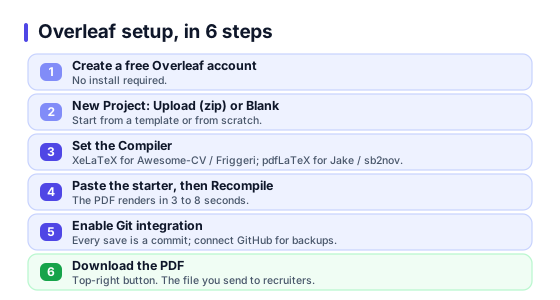
- Create a free account at overleaf.com. No install required.
- Click New Project, then Upload Project (zip) or Blank Project.
- For a template: Menu, Compiler. Set to XeLaTeX for Awesome-CV / Friggeri, or pdfLaTeX for Jake / sb2nov / ModernCV.
- Paste the starter file below into main.tex. Click Recompile. Your PDF renders in the right pane in 3 to 8 seconds.
- Version control: Menu, Git integration, enable. Now every save is a git commit. Connect to GitHub for private backups.
- Download PDF: top-right Download button. The file you send to recruiters.
Starter file (copy and paste)
Minimal, ATS-safe, 0.7in margins, 11pt body, one column, compiles in pdfLaTeX in under 5 seconds. Replace content with yours.
\documentclass[a4paper,11pt]{article}
\usepackage[margin=0.7in]{geometry}
\usepackage{titlesec}
\usepackage{enumitem}
\usepackage{hyperref}
\usepackage[T1]{fontenc}
\usepackage{charter}
\pagenumbering{gobble}

\titleformat{\section}{\large\bfseries}{}{0em}{}[\titlerule]
\titlespacing*{\section}{0pt}{10pt}{6pt}
\setlist[itemize]{leftmargin=*,itemsep=2pt,topsep=2pt}

\begin{document}

\begin{center}
{\LARGE \textbf{Your Name}} \\[2pt]
Bengaluru, India $\cdot$ you@example.com $\cdot$ +91 98xxx xxxxx $\cdot$ linkedin.com/in/you
\end{center}

\section*{Summary}
Backend engineer with 3 yrs building payments systems. Shipped 4 production services handling 12k TPS at peak.

\section*{Experience}
\textbf{Senior Engineer}, Razorpay \hfill Jan 2023 -- Present
\begin{itemize}
  \item Cut p99 checkout latency 420ms to 140ms through query and cache rewrites.
  \item Led 3-engineer pod for UPI 2.0 rollout; on-time launch to 8M users.
\end{itemize}

\section*{Education}
\textbf{B.Tech Computer Science}, IIT Madras \hfill 2019 -- 2023 \\
CGPA 8.4 / 10

\section*{Skills}
Go, Python, Postgres, Redis, Kafka, Kubernetes, AWS.

\end{document}
Swap charter for lmodern if you want Latin Modern, or mathpazo for Palatino. All three are safe defaults.
Making LaTeX resumes ATS-safe
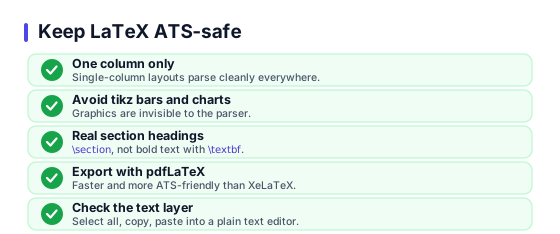
- One column only. 2-column LaTeX templates (Deedy, Friggeri) read as scrambled in Greenhouse and Workday. For ATS-bound submissions, use Jake or sb2nov.
- Avoid tikz graphics for bars and charts. Most ATS platforms ignore them. Worse, some interpret the surrounding text as corrupt.
- Use real section headings (backslash section), not bold text (backslash textbf) for section titles. LaTeX section commands export semantic structure to the PDF tree; bold text does not. ATS parsers rely on the tree.
- Export with pdfLaTeX when possible. XeLaTeX and LuaLaTeX produce beautiful output but some older ATS parsers stumble on their PDF encoding.
- Check the text layer. After compile, open the PDF and select-all, copy, paste into a plain text editor. If your content reads top to bottom in the right order, ATS will parse it cleanly.
6 common compile / layout pitfalls
PDF parses as a jumble in Workday / Greenhouse
You are probably on a 2-column template. Switch to Jake, sb2nov, or single-column Awesome-CV for ATS-bound applications.
Custom glyphs show as boxes
Overleaf uses XeLaTeX or LuaLaTeX to render fontawesome / unicode icons. Switch the Compiler setting, or strip icons for the ATS version.
Dates misaligned on the right
Use \hfill consistently. Replace tabular or flushright hacks with \hfill in each \item and each \textbf role line.
Resume spills to 2 pages unintentionally
Three knobs: reduce geometry margin to 0.6in, tighten itemsep in enumitem to 1pt, reduce font size to 10.5pt via scrextend or [11pt] -> [10pt].
Page numbers appear at bottom
Add \pagenumbering{gobble} after \begin{document}, or use \thispagestyle{empty} on the first page.
Hyperlinks not clickable
Load hyperref and wrap links with \href{url}{label}. For LinkedIn: \href{https://linkedin.com/in/you}{linkedin.com/in/you}.
External references
- Overleaf CV gallery for live previews of the templates above.
- Awesome-CV on GitHub with source, examples, and the cover-letter companion.
- Jake Gutierrez resume template on GitHub, the most ATS-friendly option on the list.
Frequently asked questions
Is LaTeX worth it for a resume?+
Is Deedy still a good template in 2026?+
pdfLaTeX vs XeLaTeX, which should I use?+
How do I keep my LaTeX resume to one page?+
Can I use LaTeX for a PhD CV?+
What font should I use in a LaTeX resume?+
Will Overleaf work offline?+
Prefer point-and-click to \\documentclass?
ResumeBuildz produces the same clean, single-column, ATS-safe output as a well-written Jake template, without a compiler. 10 minutes to a polished PDF.