The short version
Jobscan still works, but it is not the only option and it is not the cheapest. Resume Worded, Teal, Enhancv, Rezi, and SkillSyncer each cover a different angle. None is a perfect replacement. Pick based on what you actually need: keyword match, ATS simulation, or rewrite suggestions.
Jobscan charges 49 USD/month (roughly INR 4,000) for unlimited scans. That price surprises a lot of first-time users, especially when the free tier caps at 5 scans total. The output is useful (keyword match percentage, hard and soft skill gaps, formatting checks) but the scoring model can feel opaque and the rewrite suggestions are often generic.
This guide covers the six alternatives worth considering in 2026, what each one does better and worse than Jobscan, the traps to avoid when picking a checker, and how to actually use the score to improve your resume rather than just collect a number.
What actually matters in an ATS checker
Keyword match depth
A good checker extracts hard skills, soft skills, tools, and variants (SWE / SDE / Software Engineer) from the JD, then scores against your resume. Weak ones only match exact strings.
ATS parse simulation
Does the tool actually parse the resume through a pipeline resembling Workday or Taleo, or does it just count words? Simulation catches multi-column issues and weird headings.
Quantification scoring
Checking that bullets have numbers, not just verbs, is the difference between a score that predicts interview rate and a vanity score.
Content suggestions, not just a number
A score alone does not help. You need line-level rewrite suggestions or, better, category-level diagnostics (you are missing X skill, your summary is 3 lines too long).
Speed and cost per scan
If you are applying to 30 roles a week you cannot afford a tool that charges 5 USD per scan. Unlimited free or a flat subscription matters more than any single feature.
6 alternatives, head-to-head
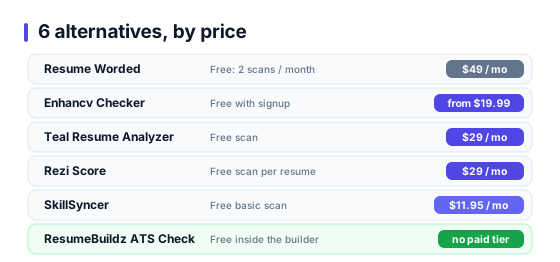
Resume Worded
Pricing: Free tier limited to 2 scans/month. Paid at 49 USD/month.
Strengths: Clean scoring UI. Good line-by-line rewrite suggestions. LinkedIn profile scorer is the best part.
Weaknesses: Keyword matching is shallow compared to Jobscan. Limited India-specific role data.
Best for: LinkedIn optimization plus general resume review.
Enhancv Checker
Pricing: Free with Enhancv signup. Paid plans start at 19.99 USD/month.
Strengths: Fast, no paywall on first checks. Grammar and impact scoring alongside keyword match.
Weaknesses: Heavy nudge toward their builder. Keyword extraction misses variants (SDE vs Software Development Engineer).
Best for: Freshers who want a quick pass plus a builder in the same tool.
Teal Resume Analyzer
Pricing: Free scan. Pro at 29 USD/month for unlimited.
Strengths: Good Chrome extension that pulls JDs from LinkedIn and Indeed directly. Solid keyword match visualisation.
Weaknesses: Heavy US-centric dataset. India and EU roles scored weaker.
Best for: US job hunts where you apply to 20+ roles a week.
Rezi Score
Pricing: Free scan per resume. Premium at 29 USD/month.
Strengths: Built around their AI writer. Score explanation is granular (brevity, use of bullets, quantification score).
Weaknesses: Scoring model rewards certain phrasing patterns, not all of which are universally good.
Best for: People who want both a score and an AI to rewrite bullets in the same tool.
SkillSyncer
Pricing: Free basic scan. Premium 11.95 USD/month.
Strengths: Cheapest paid plan on the list. Chrome extension. Clean JD-vs-resume diff view.
Weaknesses: Smaller database. Feature set has not moved much in 2 years.
Best for: Budget-conscious job hunters doing 5 to 10 applications a week.
ResumeBuildz ATS Check
Pricing: Free inside the builder. No separate tier.
Strengths: Runs inline on your resume while you edit. Checks keyword match, quantification, bullet length, and ATS readability in one pass. India role presets.
Weaknesses: Requires an account. Only scores resumes built inside the tool (for now).
Best for: Users building a resume from scratch and wanting feedback as they write, not after.
4 red flags in any ATS checker
The tool gives every resume a 90+ score.
Vanity scoring designed to make you share on social media. Ignore.
No JD field at all, just "analyze my resume".
ATS scoring without a target JD is meaningless. A resume is only ATS-optimized relative to a specific role.
The tool wants to rewrite your resume before scoring it.
That is a resume writer with a checker badge attached. Often useful, but not an independent audit.
Claim: "We simulate exactly what Workday does".
No external tool sees Workday internals. Claims of 1:1 simulation are marketing. Reasonable approximations exist; exact matches do not.
How to actually use one of these tools
Most people use ATS checkers as a final exam: paste resume, paste JD, read score, panic or celebrate. That is the wrong order. The score is a diagnostic, not a grade. Use it earlier, iterate on the resume, rescan, stop when diminishing returns kick in.
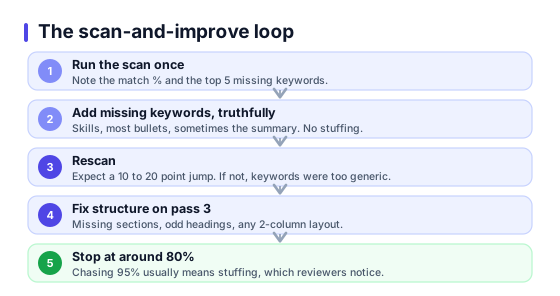
A workflow that works:
- Run the scan once with your current resume and the target JD. Note the match percentage and the top 5 missing keywords.
- Add the missing keywords where they are truthful. Skills section, most bullets, sometimes the summary. Do not stuff keywords into places they do not fit.
- Rescan. Expect a 10 to 20 point jump. If not, the keywords were too generic or were already implicit in your bullets.
- Fix structural issues (missing sections, weird headings, 2-column layout if any) on pass 3.
- Stop at around 80 percent match. Getting to 95 percent usually means keyword stuffing, which human reviewers notice.
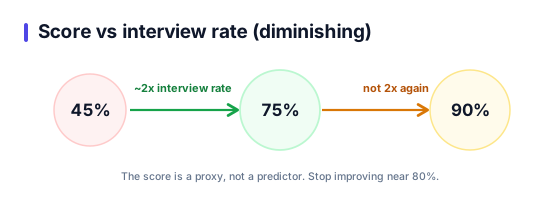
The score is proxy for interview probability, not a direct predictor. Going from 45 to 75 percent match roughly doubles interview rate in internal tests from Jobscan and Resume Worded. Going from 75 to 90 percent does not double again.
External references
Frequently asked questions
What is the best free Jobscan alternative?+
Is Resume Worded better than Jobscan?+
Do any of these actually simulate Workday?+
Do I need to pay for an ATS checker?+
Does ResumeBuildz have an ATS score?+
How accurate is an ATS score?+
Will a high ATS score guarantee an interview?+
Can I use ChatGPT as a Jobscan alternative?+
Build and score in one place
ResumeBuildz runs ATS keyword match, quantification, and readability checks inline while you edit. Free with the builder. No extra tool required.