Why legacy ATS still matters
Every year someone declares legacy ATS dead. Every year, Taleo and iCIMS process tens of millions of applications at companies like Accenture, Cognizant, Target, Lowe's, and HSBC. If you apply to large enterprises in 2026, you will still meet these systems. Their parsers are older than Workday or Greenhouse, which means the margin for error on formatting is thinner. Get the basics right and you move to the top of the keyword-match queue.
Modern resume advice often assumes the ATS on the other side is Workday, Greenhouse, or Lever. Those parsers are tolerant. They handle PDFs, infer section headings from context, and recover from the odd layout glitch. iCIMS and Taleo are a generation behind. They require you to write for the parser, not past it. The good news is the rules are short, stable, and have barely changed since 2018. Get them right once and you keep the advantage for every enterprise application.
The 8 rules that make resumes parse clean
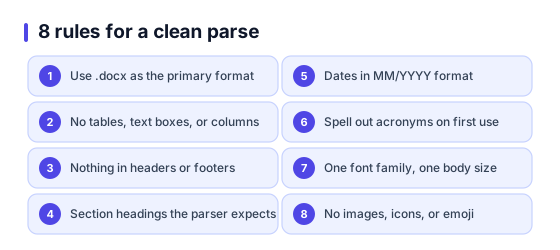
1.Stick to .docx as the primary format
Both iCIMS and Taleo have parsed .docx reliably for over a decade. Taleo in particular has historically mangled PDFs (especially older exports from InDesign or LaTeX). If a job posting accepts either format and the ATS is confirmed to be Taleo or iCIMS, upload the .docx. Keep a PDF as the secondary upload only.
2.No tables, no text boxes, no columns
Legacy parsers read the document as a flat stream. A 2-column layout gets stitched together wrong (headline from the right column glued to a bullet on the left). Tables become linear text with pipes vanishing. Text boxes are sometimes ignored entirely. Use plain paragraphs and bullet points only.
3.Headers and footers are invisible to Taleo
Taleo 15 and older versions strip header and footer content during parse. If your phone number or email lives in the header, the candidate record will be created with no contact info. Put contact details in the first body paragraph of the document.
4.Use exact section headings the parser expects
Legacy ATS parsers match on literal words. Use Work Experience, Education, Skills, Certifications. Do not use My Journey, What I Bring, or Career Story. Clever headings break the section detection and the resume parses as one giant blob of text.
5.Dates in MM/YYYY format
iCIMS and Taleo both handle MM/YYYY (06/2023) and Month YYYY (June 2023). They struggle with abbreviated forms (Jun 23 or 6-23) and international formats (2023-06 or 23/06/2023). Stick to MM/YYYY or Month YYYY across the entire document.
6.Spell out acronyms on first use
Parsers index both the acronym and the full form for keyword match, but only if they appear together. Write Search Engine Optimization (SEO) the first time, then SEO afterwards. This is the cheapest match-score boost available.
7.One font family, one size for body
Arial, Calibri, Helvetica, or Times New Roman at 10 to 11 pt for body. Two fonts (display font for headings + body font) is fine in modern ATS but legacy parsers sometimes drop styled runs and lose content. Safest default is one family across the whole document.
8.No images, icons, or emoji
Legacy parsers skip non-text elements. Skills rendered as progress bars become blank. Icons next to section headings become invisible. Any content inside an image asset is lost. Keep everything as live text.
iCIMS vs Taleo: where they differ
Both are legacy by modern standards, but they are not interchangeable. iCIMS has been updated more aggressively and uses a third-party parsing engine (Sovren). Taleo was acquired by Oracle in 2012 and its parser has seen fewer upgrades. If you know which ATS the company uses, tune your file choice accordingly.
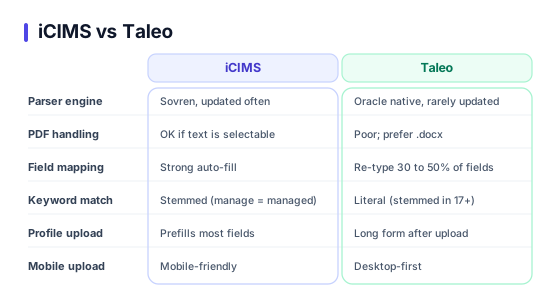
Parser engine
iCIMS: Sovren (third-party, regularly updated)
Taleo: Oracle native (infrequently updated since the Oracle acquisition)
PDF handling
iCIMS: Acceptable on selectable-text PDFs; fails on scanned images
Taleo: Historically poor; .docx strongly preferred
Field mapping
iCIMS: Strong auto-fill from parsed resume into candidate profile
Taleo: Partial auto-fill; expect to re-type 30 to 50 percent of fields
Keyword match logic
iCIMS: Stemmed match (manage, managed, managing all count)
Taleo: Literal match in older versions; stemmed in Taleo 17+
Profile upload flow
iCIMS: Upload once, LinkedIn or resume prefill most fields
Taleo: Often requires filling out a long form after upload, even if the resume had the data
Mobile upload
iCIMS: Modern mobile-friendly flow on most instances
Taleo: Desktop-first; mobile uploads sometimes lose formatting
Companies that use iCIMS and Taleo
Partial list based on public ATS adoption data. The URL of the careers page is the fastest tell: iCIMS instances usually contain jobs.icims.com; Taleo instances commonly include taleo.net or a subdomain like careers.nestle.taleo.net.
iCIMS users (examples)
- Lowe's
- Target
- General Motors
- BMW
- Capital One
- Southwest Airlines
- Humana
- Whirlpool
- Wendy's
- PulteGroup
Taleo users (examples)
- Nestle
- Accenture
- Cognizant
- HSBC
- Pfizer
- Oracle (internal)
- Johnson & Johnson
- Kellogg's
- Unilever
- Marriott
Lists shift over time as companies migrate. Check the careers-page URL before you apply.
5 mistakes that tank your match score
Using a fancy template with sidebars and icons
Switch to a single-column, plain-text resume for any Taleo or iCIMS application. Keep the fancy one for emailed referrals.
Tailoring keywords but not the exact phrasing from the JD
Literal match matters on legacy ATS. If the JD says Project Management Professional, write that; do not only write PMP.
Uploading the same resume without retyping the form
Taleo forms ask for data the parser already extracted. Fill every field; blank fields drop your match score.
Skipping the LinkedIn URL
Both platforms have a LinkedIn URL field. An empty URL flags the profile as low-engagement for some recruiters.
Leaving gaps with no context
Taleo flags unexplained gaps above 6 months. Add a 1-line entry for career breaks, freelance work, or upskilling.
Filling the profile form after upload
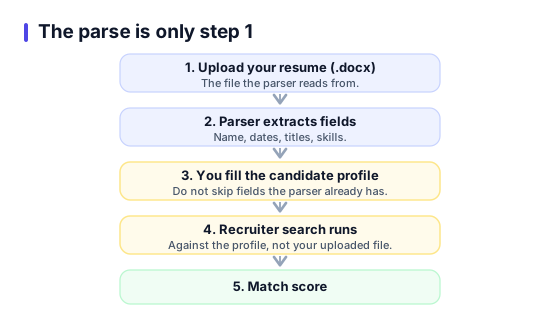
On Taleo especially, the parse is only step 1. You then fill a long candidate profile, and the recruiter search runs against that profile, not against the uploaded document. If you skip fields because the parser already has them, you lose match score.
- Fill every employment entry with start date, end date, job title, company, and a 2 to 3 line description. Yes, even if your resume already has it.
- In the Skills field, enter each skill as a separate row if the interface allows. Taleo does exact match on skill rows; free-text fields get lower weight.
- Use the JD phrasing for skills. If the JD says AWS Lambda, write AWS Lambda, not Lambda (AWS serverless compute).
- Enter education in reverse-chronological order with GPA only if above 3.5 / 4.0 (or 7.5 / 10). Lower scores can count against you.
- Attach a cover letter even when marked optional. Recruiters filtering by cover-letter-present see about 15 percent fewer applicants, so your application rises in the queue.
External references
Frequently asked questions
Should I upload PDF or DOCX for Taleo?+
Does iCIMS read graphics and icons?+
How do I tell if a company uses iCIMS or Taleo?+
Do these systems accept LinkedIn profile import?+
Is the keyword match literal or stemmed?+
Can I reuse one resume across iCIMS and Taleo?+
Do these legacy systems score my application?+
Build a resume that parses clean on iCIMS and Taleo
ResumeBuildz exports a single-column DOCX with exact section headings, plain text, and MM/YYYY dates. Zero parser-hostile flourishes. Free to start.