Short answer
Grammarly Free is a must-use final pass for any resume. It catches typos, tense drift, and agreement errors that a tired human eye will miss. Grammarly Premium is not worth the subscription for resumes alone. For the bigger work (weak verbs, hallucinated numbers, ATS formatting, JD alignment) you need an LLM, Hemingway, or a human reviewer. Grammarly fills one lane well; it does not cover the whole road.
The question this post answers is narrow on purpose. Grammarly is a spelling and grammar checker. It was not built for resumes specifically. Asking whether Grammarly fixes a resume is like asking whether a spellchecker writes an essay. The answer is no, but it will catch the dozen embarrassing slips that would otherwise end the review. The mistake is assuming that a green Grammarly score means the resume is good. It does not. A perfectly grammatical resume full of Responsible for bullets and no numbers is still a weak resume.
This guide splits what Grammarly does well from what it misses, covers the 5 situations where its suggestions actively hurt a resume, and lays out a 4-step proofing workflow that stacks Grammarly with other tools so each one does the job it is good at.
What Grammarly catches (and does well)
This is the honest case for running Grammarly over your resume. On the items below, it is reliable, fast, and free.
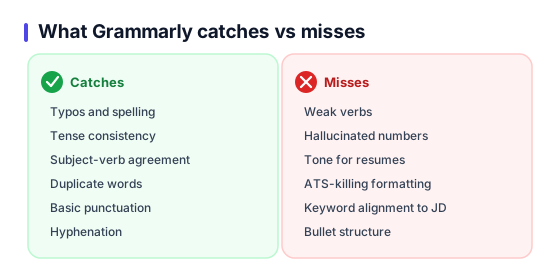
Typos and spelling
Catches 90 percent of common misspellings (managment, recieve, seperated). This alone is worth the free tier. One typo on a resume is enough to end the review at some firms.
Tense consistency
Flags when past roles slip into present tense (Manage a team of 8 on a job from 2021). Resume tense is one of the top 3 reasons recruiters lose trust in a candidate on the first scan.
Subject-verb agreement
Led team that were responsible is an easy miss when you have edited the same line 20 times. Grammarly flags it reliably.
Duplicate words
Managed managed the rollout. Happens more than you think after copy-paste iterations. Free tier catches these.
Basic punctuation
Missing periods on bullets, stray commas inside numbered lists, rogue semicolons. All caught on free.
Hyphenation in compound modifiers
Data driven vs data-driven, full stack vs full-stack. Inconsistent hyphenation makes a resume look rushed. Premium is better here but free gets most of them.
If this were the whole proofing job, Grammarly would be enough. It is not. The next section covers what it does not see.
What Grammarly misses (the big stuff)
Grammarly checks grammar. It does not check whether your resume will get interviews. These 6 categories are where it is blind.
Weak verbs
Responsible for, worked on, helped with. Grammatically perfect, career-killing. Grammarly does not know that Led, Shipped, Architected would parse 3x better for a recruiter.
Hallucinated numbers
If you wrote Grew revenue 300 percent when you meant 30 percent, Grammarly will happily approve it. Proof-against-the-original is a human job.
Tone for resumes
Grammarly suggests smoothing prose that should stay terse. Resume bullets are not essays; its default suggestions soften punchy writing.
ATS-killing formatting
Grammarly does not see your layout. It cannot tell you that your 2-column PDF will scramble in Workday parsers.
Keyword alignment to JD
Matching your bullets to the job description language is the single highest-leverage resume edit. Grammarly has zero awareness of the JD you are applying to.
Bullet structure
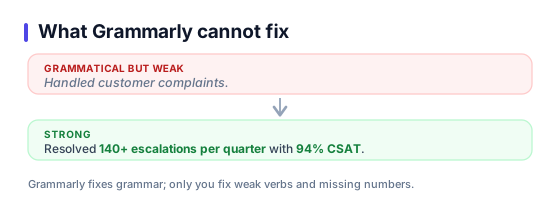
Action verb + what + quantified result. Grammarly will not restructure Handled customer complaints into Resolved 140+ customer escalations per quarter with 94 percent CSAT.
Free vs Premium for resumes
Grammarly Premium costs around 12 USD per month on annual billing. The question is whether the premium features pull their weight on a resume specifically.
Premium adds clarity scoring, tone detection, word-choice alternatives, and full-sentence rewrites. On a bullet-point resume most of this is irrelevant. Clarity scoring on a 12-word bullet tells you nothing useful. Tone detection on a resume is a non-problem; the tone should be neutral-professional and you already know that. Word-choice alternatives occasionally help, but a free LLM will do a better rewrite in one prompt.
Where Premium does earn its keep is on cover letters and LinkedIn About sections, which are prose-heavy and benefit from a clarity pass. If you also use Grammarly for email, essays, or client writing, Premium makes sense across that portfolio. Buying Premium only for resume editing does not.
Verdict
- Grammarly Free: yes, always, for every resume.
- Grammarly Premium for resumes only: skip. Put the 12 USD into an LLM subscription or a human reviewer.
- Grammarly Premium for broader writing: reasonable, and you get resume checks as a bonus.
5 situations where Grammarly hurts
Accepting every Grammarly suggestion is a bad idea. These 5 patterns come up on almost every resume and you should override each one.
Over-smoothing industry jargon
Grammarly flags terms like EBITDA, SLI, p99, CAC, NRR as unclear. For finance, SRE, growth, SaaS resumes these terms are exactly what recruiters search for. Dismiss and keep.
Suggesting passive rewrites for active verbs
Shipped 14 features is sometimes suggested as 14 features were shipped. This is the opposite of resume best practice. Always keep active.
Demanding articles on bullet starters
Grammarly sometimes insists on The or A in front of bullets. Resumes drop articles at bullet start on purpose. Ignore.
Flagging industry acronyms as typos
K8s, TLS, CI/CD, NPS, ARR. Not typos. Add each to your personal dictionary once and Grammarly stops complaining.
Rewording quantified phrasing into soft language
Grew from 0 to 12k users in 90 days to Significantly grew user base. Never accept. Numbers beat adverbs on a resume, always.
Alternatives and when to use each
Grammarly is one tool in a stack, not a replacement for the stack. Each tool below does a different part of the job.
Grammarly Free
Typos, tense, subject-verb agreement, duplicate words, basic punctuation. Install it, run every resume through it, free forever.
Grammarly Premium
Tone adjustments, word-choice suggestions, clarity scoring. Useful for cover letters; marginal for bullet-heavy resumes. Not worth the subscription for resumes alone.
ChatGPT / Claude
Restructuring weak bullets, adding action verbs, tailoring to a JD. Completely different job than Grammarly. Use both, not one.
Hemingway Editor
Adverb and passive-voice overuse, sentence-length audits. Free web tool, better than Grammarly for resume concision.
Manual read-aloud
Catches tone, rhythm, ugly repetition. Takes 4 minutes. Nothing replaces this step no matter how many tools you run.
Recommended proofing workflow
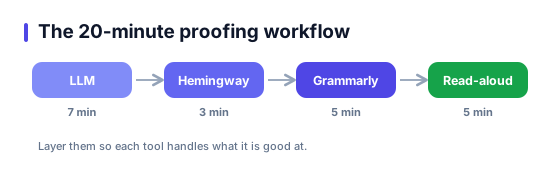
Layer the tools so each one handles what it is good at. 20 minutes end to end.
- LLM pass (7 min). Paste your resume into Claude or ChatGPT with the JD. Ask for 3 rewrites of the weakest 5 bullets. Keep the ones that add specificity, reject the ones that invent facts.
- Hemingway pass (3 min). Paste into hemingwayapp.com. Target grade 8 or below. Cut adverbs, simplify any hard-to-read bullets.
- Grammarly pass (5 min). Free tier is enough. Accept typos, tense, and agreement fixes. Reject any suggestion that softens action verbs or adds articles to bullet starters.
- Read-aloud pass (5 min). Read every bullet out loud. Awkward rhythm, repeated openers, weak closers all jump out. Nothing replaces this step.
External references
Frequently asked questions
Does Grammarly help for a resume?+
Is Grammarly Premium worth it for resumes?+
Grammarly vs ChatGPT for resume: which is better?+
Can Grammarly catch AI-sounding writing?+
Is there a free alternative to Grammarly?+
Should I let Grammarly rewrite my bullets?+
Does Grammarly see my resume formatting?+
How often should I run Grammarly on the resume?+
Skip the proofing stack. Start with bullets that are already clean.
ResumeBuildz suggests action verbs, flags weak phrasing, and keeps tense consistent while you type. Fewer passes, fewer rewrites.